
Secure Zero-Touch Provisioning for IP Endpoint Fleets via HTTPS and DHCP Option 66
Overview
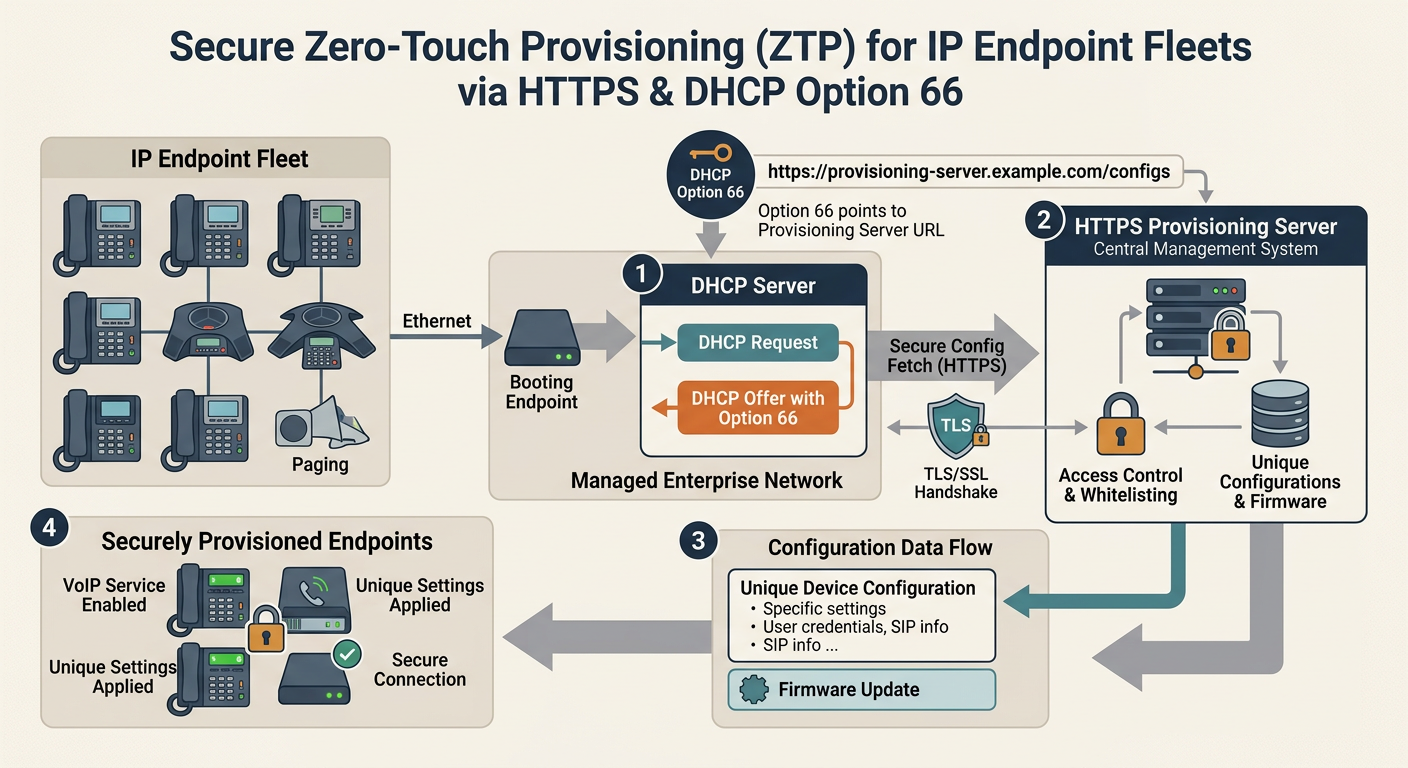
This guide explains how to design and deploy a secure Zero-Touch Provisioning (ZTP) architecture for large IP endpoint fleets using DHCP options and HTTPS transport. Readers will learn the mechanics of the endpoint boot sequence, DHCP Option 66/160 configuration, web server setup with Mutual TLS (mTLS) device authentication, and best practices for protecting sensitive SIP credentials in transit.
Key takeaways
- DHCP Option 66 delivers the bootstrap HTTPS provisioning URL directly to endpoints during network attachment.
- HTTPS transport enforces server identity verification, protecting SIP credentials and configuration files from eavesdropping.
- Mutual TLS (mTLS) utilizing factory-installed device certificates ensures that only authorized hardware can fetch endpoint profiles.
- Dynamic web applications should render $MAC.cfg files on-demand from a centralized database rather than relying on static flat files.
- Voice VLAN isolation and strict access control lists (ACLs) are essential network hardening defenses for ZTP environments.
Prerequisites
- Fundamental knowledge of IPv4, DHCP, DNS, and Public Key Infrastructure (PKI).
- Administrative access to network DHCP servers (e.g., ISC DHCP, Kea, or router OS).
- Experience configuring web servers (e.g., Nginx, Apache) and TLS certificates.
Guide
- section #1
Architecture Overview of Zero-Touch Provisioning Zero-Touch Provisioning (ZTP) allows network administrators to deploy IP phones directly from their factory boxes without manually configuring individual devices. When an endpoint powers on, it requests an IP address via DHCP. Along with standard network parameters (IP, subnet mask, gateway, DNS), the DHCP response includes specific vendor options instructing the device where to download its boot configuration. The phone then sends an HTTPS request to the specified provisioning server, retrieves its general and MAC-specific configuration files (such as 00155d010203.cfg), applies the parameters, and registers to the designated SIP server. By combining automated discovery with encrypted transport, organizations can deploy thousands of endpoints consistently and securely.
- section #2
DHCP Server Configuration for Option 66 and Option 160 DHCP Option 66 (tftp-server-name) was historically used to supply a hostname or IP address for TFTP downloads. Modern IP endpoints repurpose Option 66 to accept full HTTPS URLs (e.g., https://prov.example.com/configs/). However, string handling in Option 66 can vary by vendor. Some devices require DHCP Option 160 or Option 67 (bootfile-name) to parse full URL paths containing subdirectories. Below is an example configuration for ISC DHCP Server (dhcpd.conf) that defines vendor-specific classes and passes an HTTPS URL formatted for endpoint ingestion.
plaintext# /etc/dhcp/dhcpd.conf option space vendor-encapsulated-options; option ip-telephone-sntp-server code 42 = array of ip-address; # Define custom Option 160 for vendors preferring it over Option 66 option option-160 code 160 = text; subnet 10.50.0.0 netmask 255.255.255.0 { range 10.50.0.100 10.50.0.250; option routers 10.50.0.1; option domain-name-servers 10.50.0.2, 10.50.0.3; # Option 66 delivering full HTTPS target URL option tftp-server-name "https://prov.example.com/provisioning"; # Fallback Option 160 for strict RFC implementation vendors option option-160 "https://prov.example.com/provisioning"; } - section #3
Securing Provisioning Transport with HTTPS & TLS Verification Transmitting configuration files over unencrypted protocols like TFTP or HTTP exposes sensitive data—including plain-text SIP digest passwords, administrative web passwords, and internal network architecture details—to packet sniffing. Utilizing HTTPS encrypts all payload traffic using TLS. Enterprise IP phones from major vendors (such as Yealink, Poly, Cisco, and Grandstream) ship with pre-installed Root CA bundles in their firmware. When the phone receives the HTTPS URL from DHCP, it performs standard TLS server certificate validation against these built-in certificates. Ensure that your provisioning server's TLS certificate is issued by a widely recognized commercial Certificate Authority (such as Let's Encrypt, DigiCert, or Sectigo) to avoid validation failures during the boot cycle.
- section #4
Endpoint Authentication via Mutual TLS (mTLS) While standard HTTPS verifies the server's identity to the phone, it does not prevent an unauthorized device on the network from forging a request for another phone's MAC address configuration (e.g., GET /00155d010203.cfg). Mutual TLS (mTLS) solves this by requiring the phone to present its own client certificate during the TLS handshake. Most major manufacturers embed a unique Manufacturer Installed Certificate (MIC) or Initial Device Identifier (IDevID) inside a secure hardware element during production. The provisioning web server can be configured to validate this client certificate against the manufacturer's Intermediate CA before granting access to sensitive endpoint configurations.
nginx# Nginx Virtual Host enforcing mTLS for Provisioning server { listen 443 ssl http2; server_name prov.example.com; ssl_certificate /etc/ssl/certs/prov_server.crt; ssl_certificate_key /etc/ssl/private/prov_server.key; # Trust Vendor Intermediate CAs (e.g., Poly, Yealink Root/Intermediates) ssl_client_certificate /etc/ssl/certs/vendor_ca_chain.crt; ssl_verify_client on; ssl_verify_depth 3; location /provisioning/ { # Reject request if client certificate verification failed if ($ssl_client_verify != SUCCESS) { return 403; } # Pass authenticated client CN (MAC address) to backend service proxy_set_header X-Client-DN $ssl_client_s_dn; proxy_set_header X-Client-Verify $ssl_client_verify; proxy_pass http://127.0.0.1:8080; } } - section #5
Dynamic Configuration Generation Architecture Serving static XML or flat text configuration files from disk introduces administrative overhead and increases security risk. Instead, route provisioning requests to a dynamic application backend (Node.js, Python/Flask, PHP, or Go). When a phone requests its configuration file using its MAC address, the backend application authenticates the request context, extracts the MAC address, queries an inventory database (such as PostgreSQL or MySQL), and renders an individualized configuration file on the fly. This architecture enables dynamic injection of ephemeral SIP credentials, automatic firmware version enforcement, and real-time audit logging.
pythonfrom flask import Flask, request, Response, abort import re app = Flask(__name__) @app.route('/provisioning/<filename>') def serve_config(filename): # Extract MAC address from filename (e.g., '00155d010203.cfg' -> '00155d010203') match = re.match(r'^([0-9a-fA-F]{12})\.cfg$', filename) if not match: abort(404) mac_address = match.group(1).lower() # Retrieve endpoint configuration parameters from database device = db_get_device(mac_address) if not device: abort(404) # Render dynamically populated XML/flat configuration template config_payload = render_template('yealink_template.xml', username=device.sip_username, password=device.sip_password, domain=device.sip_domain) return Response(config_payload, mimetype='text/plain') - section #6
Vendor-Specific Boot Dynamics and Redirection Traps IP endpoints from different manufacturers process DHCP options and HTTP redirects with subtle variations. Poly (Polycom) phones strictly parse DHCP Option 160 or 66 and require explicit formatting to accept custom CA certificates. Yealink devices readily accept HTTPS URLs in Option 66, but if a local server fails to respond, they may fall back to the Yealink Management Cloud Service (YMCS) redirection service. Cisco Enterprise phones often expect Option 150 (a list of TFTP/HTTPS server IPs) or Option 67 containing the exact path to XMLDefault.cnf.xml. Testing boot workflows across all hardware revisions in your environment is critical before rolling out DHCP ZTP changes fleet-wide.
- section #7
Network Hardening and Operational Security DHCP Option 66 security relies on network-layer protections in addition to TLS encryption. First, isolate all VoIP hardware into a dedicated Voice VLAN using IEEE 802.1X network access control or LLDP-MED to prevent untrusted user devices from receiving provisioning DHCP options. Second, enable DHCP Snooping on network switches to block rogue DHCP servers from injecting malicious Option 66 URLs. Third, apply strict rate limiting and IP subnet filtering on the web server to mitigate brute-force MAC enumeration attacks. Finally, rotate SIP digest passwords periodically and implement short-lived token authentication where supported by endpoint firmware.
Further reading
- RFC 2132 - DHCP Options and BOOTP Vendor Extensions
- RFC 5280 - Internet X.509 Public Key Infrastructure Certificate and Certificate Revocation List (CRL) Profile
- RFC 8446 - The Transport Layer Security (TLS) Protocol Version 1.3
- Yealink IP Phones Auto Provisioning Guide
- Poly UC Software Provisioning Technical Overview