
Kamailio as a Stateful Proxy and Load Balancer: Dispatcher Module Configuration
Overview
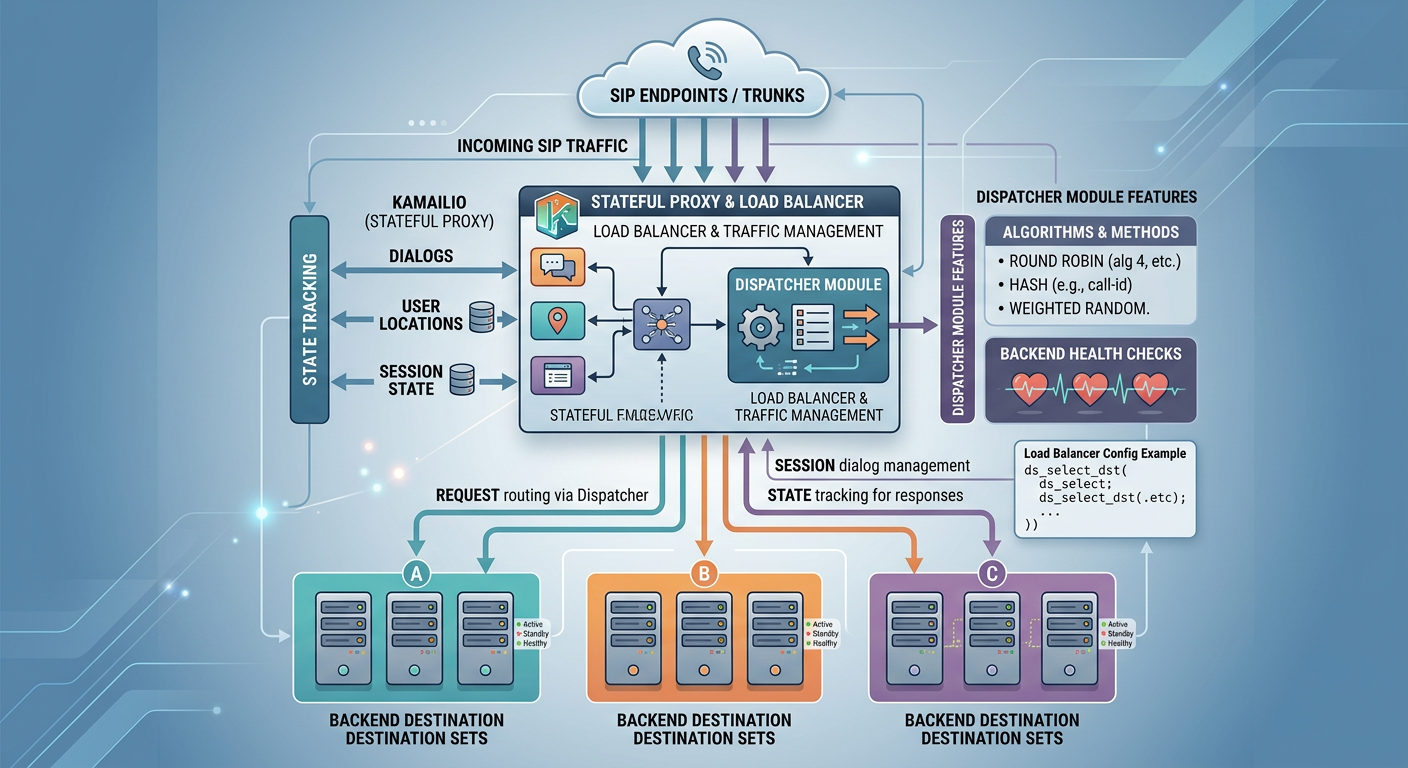
This guide explains how to configure Kamailio as a stateful SIP proxy and high-performance load balancer using the TM (Transaction Management) and Dispatcher modules. You will learn how to define destination sets, select load balancing algorithms, handle automatic downstream failover, and manage destination health checks. By the end of this guide, you will be able to deploy a robust entry point for distributing SIP traffic across media servers or PSTN gateways.
Key takeaways
- Stateful proxying with Kamailio relies on the TM module to maintain transaction context required for parallel/serial forking and failover.
- The Dispatcher module distributes SIP traffic across gateway sets using customizable algorithms such as round-robin, weight-based, or call-load hashing.
- Active health checks (OPTIONS probes) continuously monitor downstream targets and dynamically remove unreachable nodes from the active pool.
- The failure_route block enables seamless failover to alternative targets when a primary destination returns a SIP error or times out.
- Dynamic configuration reloads via kamcmd allow zero-downtime updates to destination sets.
Prerequisites
- Basic understanding of SIP request methods (INVITE, OPTIONS, ACK) and stateful transaction handling.
- Kamailio 5.x installed on a Linux system with basic networking configured.
- Root or sudo privileges to modify Kamailio configuration files and execute kamcmd commands.
Guide
- section #1
Stateful Proxying Architecture with the TM Module In stateless mode, Kamailio forwards SIP messages independently without tracking transaction state. However, acting as a smart load balancer requires stateful transaction management. The Transaction Management (tm) module tracks requests and responses, forming transaction memory structures (uac/uas branches). This state tracking is essential for absorbing retransmissions, handling downstream SIP timeouts, and invoking failure_route blocks when a target fails to respond or returns a 5xx error.
- section #2
Defining Destination Sets in Dispatcher The Dispatcher module reads destination gateways from a text file, database table, or memory cache. Destinations are grouped into Set IDs, allowing you to isolate different tiers of traffic (e.g., media servers, PSTN trunks, or voicemail clusters). Each destination entry specifies the target URI, flags for active monitoring, weights for proportional routing, and extra parameters for priority or socket binding.
text# Format: setid destination flags priority attributes # Set 1: Asterisk Media Servers (Flags: 8 = probing enabled; 0 = active default) 1 sip:192.168.10.11:5060 0 0 weight=50;name=asterisk01 1 sip:192.168.10.12:5060 0 0 weight=50;name=asterisk02 # Set 2: Outbound PSTN Gateways 2 sip:10.0.0.1:5060 0 0 weight=70;name=carrier-a 2 sip:10.0.0.2:5060 0 0 weight=30;name=carrier-b - section #3
Loading and Configuring Module Parameters To enable stateful dispatching, you must load tm.so, rr.so (Record-Route), and dispatcher.so in your kamailio.cfg file. Key dispatcher parameters configure the location of the destination list, active probing intervals, probe methods, and state flags. Tuning ds_ping_interval and ds_probing_threshold ensures rapid detection of failing nodes without overwhelming healthy endpoints with excess OPTIONS traffic.
cloadmodule "tm.so" loadmodule "rr.so" loadmodule "dispatcher.so" # Module parameters for Dispatcher modparam("dispatcher", "list_file", "/etc/kamailio/dispatcher.list") modparam("dispatcher", "flags", 2) modparam("dispatcher", "ds_ping_interval", 10) modparam("dispatcher", "ds_ping_method", "OPTIONS") modparam("dispatcher", "ds_ping_from", "sip:ping@lb.example.com") modparam("dispatcher", "ds_probing_threshold", 3) modparam("dispatcher", "ds_inactive_threshold", 2) modparam("dispatcher", "ds_ping_reply_codes", "200,404,408") - section #4
Implementing Dispatcher Routing Logic in request_route When an incoming INVITE reaches the request_route, Kamailio creates a transaction using t_newtran() or implies statefulness by calling t_relay(). The ds_select_dst(set_id, algorithm) function picks an active destination from the specified set based on the chosen routing algorithm (e.g., 0 for Hash-Over-Call-ID, 4 for Round-Robin, 8 for Weighted-Load). Before relaying, arm the failure_route to capture downstream failures.
croute[DISPATCH] { # Select destination from Set 1 using Round-Robin (algorithm 4) if (!ds_select_dst("1", "4")) { send_reply("503", "No Destinations Available"); exit; } # Enforce Record-Routing to stay in the signaling path for dialogs record_route(); # Arm failure route to catch downstream timeouts/errors t_on_failure("DISPATCH_FAILURE"); # Relay statefully if (!t_relay()) { sl_reply_error(); } exit; } - section #5
Handling Downstream Failover in failure_route If the selected gateway responds with a SIP error code (such as 500 Server Internal Error or 503 Service Unavailable) or triggers a transaction timeout (408/480), Kamailio catches the execution in the designated failure_route. Calling ds_next_dst() automatically advances the Request-URI to the next available target in the set created during the initial ds_select_dst() call.
cfailure_route[DISPATCH_FAILURE] { if (t_is_canceled()) { exit; } # Check if failure code warrants attempting another gateway if (t_check_status("500|502|503|408")) { # Mark target as temporarily inactive if needed ds_mark_dst("ip"); # Try selecting the next destination from the original set if (ds_next_dst()) { # Re-arm the failure route for the new branch t_on_failure("DISPATCH_FAILURE"); t_relay(); exit; } } } - section #6
Runtime Operations and Health Management via RPC The Dispatcher module exposes JSON-RPC and RPC commands via kamcmd to perform dynamic administrative tasks without restarting Kamailio. Operators can inspect destination states, manually set gateway administrative flags (Active, Inactive, Probing), and reload the configuration on the fly when adding or removing backends.
bash# Reload destination list dynamically kamcmd dispatcher.reload # Dump current destination list and active state kamcmd dispatcher.list # Manually set destination state (set_id, uri, state: 0=active, 1=inactive, 2=probing) kamcmd dispatcher.set_state 1 "sip:192.168.10.11:5060" 1
Further reading
- Kamailio Dispatcher Module Official Documentation: https://kamailio.org/docs/modules/stable/modules/dispatcher.html
- Kamailio TM (Transaction Module) Documentation: https://kamailio.org/docs/modules/stable/modules/tm.html
- SIP Load Balancing Strategies with Kamailio Core Routing Engine