
Diagnosing High RTP Jitter and Out-of-Order Packets Using Wireshark
Problem
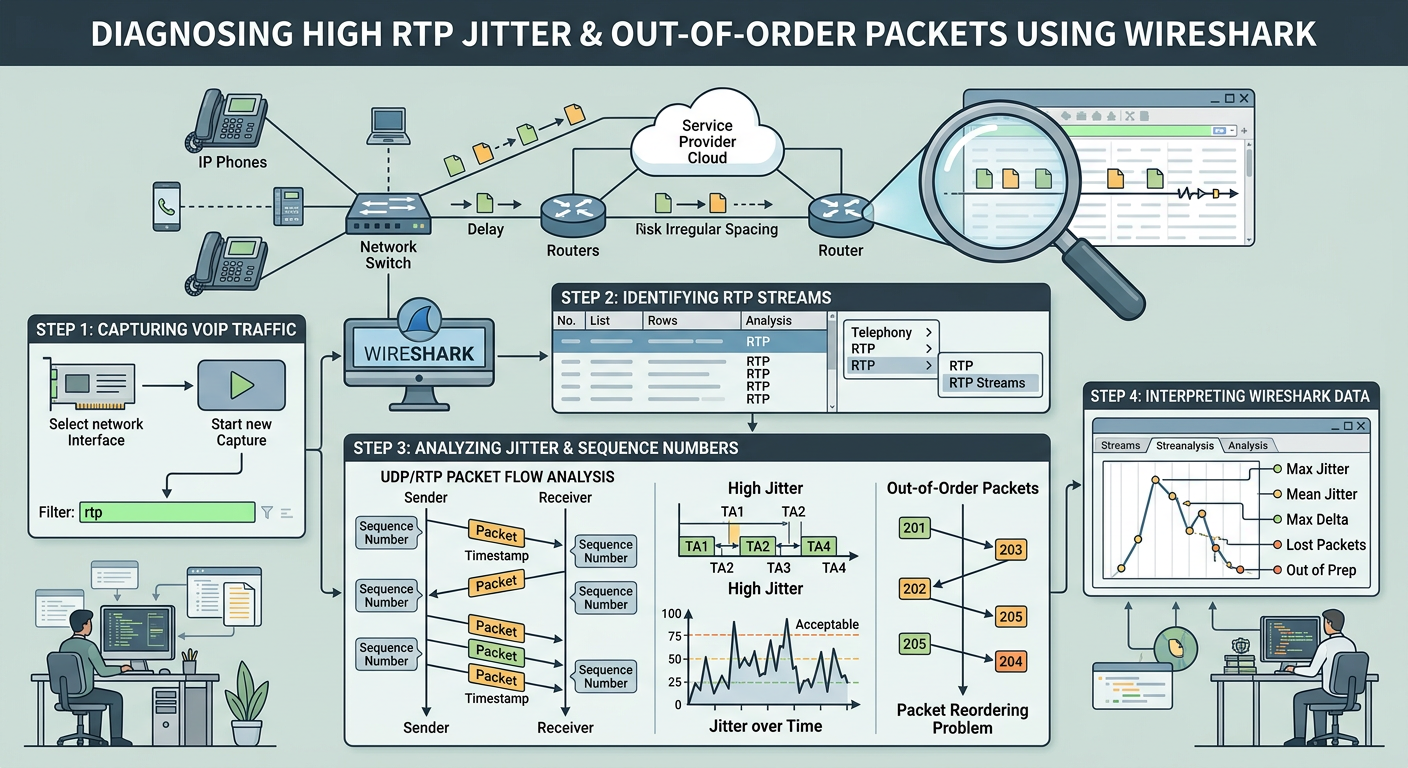
Users report degraded voice quality, robotic audio, speech clipping, or audio drops during active VoIP calls. Packet captures reveal high RTP jitter (>30ms) and out-of-order packet delivery causing jitter buffer underruns and overruns on receiving endpoints.
Symptoms
- Choppy, robotic, or clipped speech during voice calls
- Wireshark RTP Stream Analysis reports Mean Jitter > 30ms or Max Jitter > 100ms
- Sequence number gaps and out-of-order flags present in packet captures
- Intermittent audio delay or sync issues during longer calls
- IP desk phones logging elevated jitter buffer discard counters
Root cause
Network Layer 3 congestion, unprioritized WAN traffic lacking DSCP/QoS enforcement, asymmetric path routing, or overloaded intermediate switch/router packet buffers causing variable packet delivery latency and packet reordering.
Resolution steps
- step #1
Capture raw packet data on the network interface or Session Border Controller (SBC) where audio degradation occurs, ensuring full packet payloads are saved.
bashtcpdump -i eth0 -n -s 0 -w rtp_troubleshooting.pcap 'udp and (port 5060 or portrange 10000-20000)' - step #2
Use tshark from the command line to quickly extract summary statistics for all RTP streams present in the PCAP file.
bashtshark -r rtp_troubleshooting.pcap -q -z rtp,streams - step #3
Open the capture in Wireshark and navigate to Telephony -> RTP -> RTP Streams. Select the degraded call stream and click 'Analyze' to open the RTP Stream Analysis window.
- step #4
Examine the Delta, Jitter, and Sequence Number columns in the RTP Stream Analysis table to isolate transient latency spikes and reordered packets.
wiresharkrtp && (rtp.jitter > 0.030 || rtp.seq_prob) - step #5
Inspect the Differentiated Services Code Point (DSCP) field in the IPv4 header of the affected RTP stream to confirm proper Quality of Service (QoS) tagging.
bashtshark -r rtp_troubleshooting.pcap -Y "rtp" -T fields -e ip.src -e ip.dst -e ip.dsfield.dscp -e rtp.seq -e rtp.jitter | head -n 30 - step #6
Play back the RTP stream audio using Wireshark's built-in player (Telephony -> RTP -> Player) to correlate audible jitter artifacts with specific sequence numbers and graph spikes.
- step #7
Remediate the underlying network path issue by configuring IPtables/router rules to enforce Expedited Forwarding (EF / DSCP 46) on all RTP media ranges.
bashiptables -t mangle -A POSTROUTING -p udp --dport 10000:20000 -j DSCP --set-dscp 46
Verification evidence
Wireshark 'Telephony -> RTP -> Stream Analysis' output showing Mean Jitter > 30ms, Max Jitter > 100ms, and non-zero 'Sequence Errors' or 'Out-of-Order' counters in the stream summary window.