
Capturing and Decrypting SIP TLS Traffic on Port 5061 for VoIP Troubleshooting
Overview
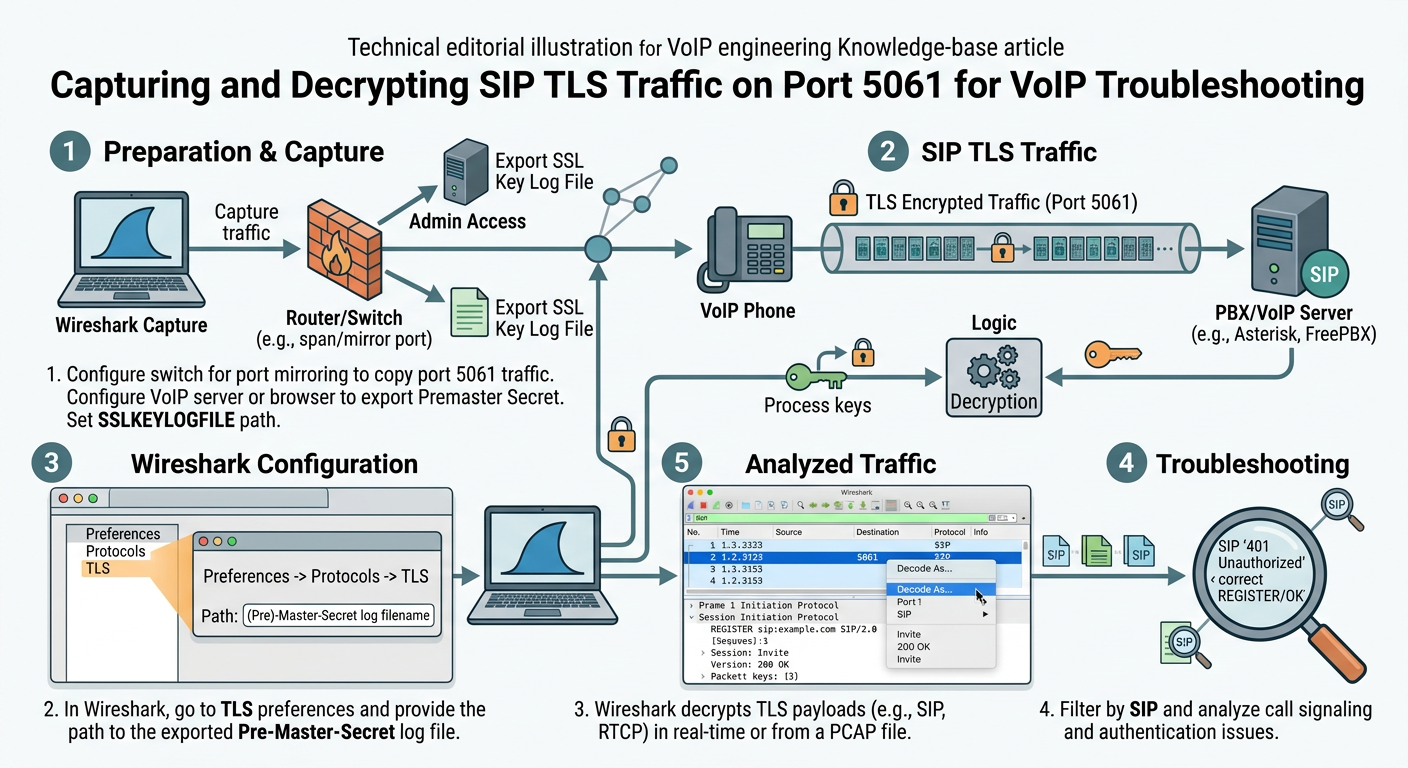
Troubleshooting Secure SIP (SIPS) issues requires visibility into both the TLS handshake mechanics and the underlying SIP payload. This guide explains how to capture encrypted traffic on TCP port 5061 using command-line utilities and decrypt the payloads within Wireshark. You will learn the distinctions between static RSA decryption and Perfect Forward Secrecy (PFS), alongside practical steps to analyze handshake failures and decrypted SIP signaling.
Key takeaways
- SIP over TLS conventionally uses TCP port 5061 and wraps standard SIP messages inside TLS records.
- Capturing raw network traffic with tcpdump yields encrypted binary blobs that require cryptographic material to read.
- Static RSA key exchanges can be decrypted directly in Wireshark using the server's private key, provided no Ephemeral Diffie-Hellman (PFS) cipher is used.
- Modern TLS deployments using Perfect Forward Secrecy (ECDHE/DHE) require symmetric master secrets (SSLKEYLOGFILE) for decryption.
- Decrypted captures allow inspection of TLS Alert messages, certificate chain verification errors, and post-handshake SIP messaging.
Prerequisites
- Root or sudo access to the target VoIP gateway, SBC, or PBX server.
- Basic proficiency with tcpdump or tshark command-line capture tools.
- Wireshark installed on a local desktop environment.
- Access to the server's TLS private key or SSLKEYLOGFILE output from the running application.
Guide
- section #1
Understanding SIP over TLS and Port 5061 SIP over TLS (often denoted in URIs as sips:) wraps standard SIP signaling inside an encrypted Transport Layer Security tunnel, operating by default over TCP port 5061. During connection establishment, the client and server complete a TCP three-way handshake followed immediately by a TLS handshake. If certificate verification fails, cipher suites mismatch, or hostnames do not align, the TLS handshake terminates with a TLS Alert message before any SIP data is transmitted. When troubleshooting registration failures, call setup drops, or one-way signaling on port 5061, capturing raw network traffic is essential to identify whether the failure occurs at the transport/TLS layer or within the application layer.
- section #2
Capturing Traffic on Port 5061 Using tcpdump To analyze secure SIP behavior on a headless server, use tcpdump to record full packet payloads on port 5061. It is vital to set a packet snap length of 0 (unlimited) so TLS records and certificates are not truncated. Save the output directly to a PCAP file for local inspection.
bashsudo tcpdump -i any -s 0 -w /tmp/sip_tls_capture.pcap tcp port 5061 - section #3
Differentiating RSA Key Exchange vs. Perfect Forward Secrecy (PFS) Decryption methodology depends entirely on the TLS cipher suite negotiated during the handshake. In legacy RSA key exchanges (e.g., TLS_RSA_WITH_AES_128_CBC_SHA), the premaster secret is encrypted directly with the server's RSA public key. Consequently, supplying the server's RSA private key to Wireshark allows retroactive decryption of all captured sessions. Conversely, modern cipher suites utilizing Diffie-Hellman key exchanges (DHE/ECDHE) offer Perfect Forward Secrecy (PFS), generating unique ephemeral session keys that cannot be derived solely from the server's long-term RSA key. For PFS ciphers, session key logging (via SSLKEYLOGFILE or application debug hooks) is strictly required.
bash# Convert an encrypted RSA key to an unencrypted PEM format for Wireshark openssl rsa -in /etc/ssl/private/server.key -out /tmp/server_unencrypted.key - section #4
Configuring Wireshark to Decrypt RSA-based TLS Traffic If your SIP entity uses a static RSA key exchange, load the server's unencrypted private key directly into Wireshark's protocol preferences. Navigate to Preferences -> Protocols -> TLS (or SSL in older versions). Under the RSA Keys List, add an entry specifying the server IP address, port 5061, protocol set to 'sip', and the path to the unencrypted private key file. Once applied, Wireshark automatically decrypts the application data, revealing a nested 'SIP' protocol tab in the frame details panel alongside the TLS layer.
textWireshark RSA Key Configuration String format: 192.168.1.500,5061,sip,/path/to/server_unencrypted.key - section #5
Decrypting PFS Traffic Using Key Log Files (SSLKEYLOGFILE) When Diffie-Hellman cipher suites are active, Wireshark must be provided with the symmetric secrets generated during the TLS handshake. Client or server software (such as OpenSSL-based applications, Chrome, or custom SIP stacks) can be configured to dump pre-master secrets into a text file via the SSLKEYLOGFILE environment variable. In Wireshark, navigate to Preferences -> Protocols -> TLS and set the '(Pre)-Master-Secret log filename' to point to this generated log file. Wireshark will dynamically cross-reference the client random values in the PCAP with the secrets file to decrypt the traffic.
bash# Exporting environment variable prior to starting an OpenSSL test client or TLS application export SSLKEYLOGFILE=/tmp/tls_secrets.log # OpenSSL test client command verifying TLS connection to SIP port openssl s_client -connect sip.example.com:5061 -tls1_2 -showcerts - section #6
Analyzing Handshake Failures and Decrypted SIP Payloads After configuring decryption, analyze the capture chronologically. If the TLS handshake fails, examine the unencrypted TLS Record layer to locate 'Alert' messages. Common alerts include 'Level: Fatal, Description: Unknown CA' (indicating missing root certificates) or 'Handshake Failure' (indicating incompatible cipher suites). If the TLS tunnel completes successfully, filtering by 'sip' displays the decrypted REGISTER, INVITE, and response messages. You can now trace standard SIP call flows, verify Digest Authentication headers, and inspect SDP offers that were previously obscured inside the TLS payload.
textWireshark Display Filters for SIP/TLS Troubleshooting: tls.record.type == 21 # Filters TLS Alert messages tls.handshake.type == 11 # Filters Certificate exchanges sip.CSeq.method == "REGISTER" # Filters decrypted SIP REGISTER requests
Further reading
- RFC 3261: SIP - Session Initiation Protocol (Section 26: Security Considerations)
- RFC 5630: Secure Session Initiation Protocol (SIPS) Behavior
- Wireshark Official Documentation: TLS Decryption Options
- OpenSSL Documentation: s_client Command Line Utilities